> ## Documentation Index
> Fetch the complete documentation index at: https://moengage-doc-2312-standard-user-attributes.mintlify.site/llms.txt
> Use this file to discover all available pages before exploring further.
# Why Is an Anonymous User Profile Created with an Uninstall Event Linked to a Campaign ID?
> Find out why anonymous user profiles appear with uninstall events tied to campaign IDs, and how to trace the campaign that triggered them.
## Problem
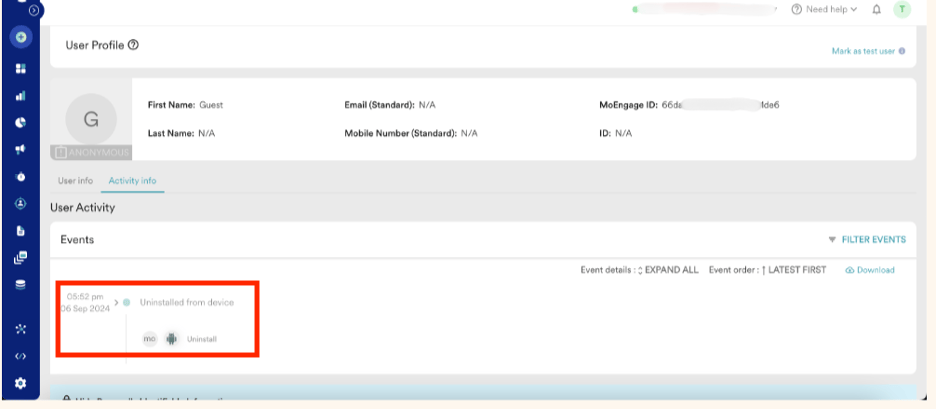
An anonymous user profile is created containing only an uninstall event. It contains no actual user information and does not map to a registered profile.
 ## Solution
Perform the following steps:
* Expand the uninstall event in the **Activity info** to check for campaign details.
* Locate the **Campaign ID** associated with this event.
## Solution
Perform the following steps:
* Expand the uninstall event in the **Activity info** to check for campaign details.
* Locate the **Campaign ID** associated with this event.
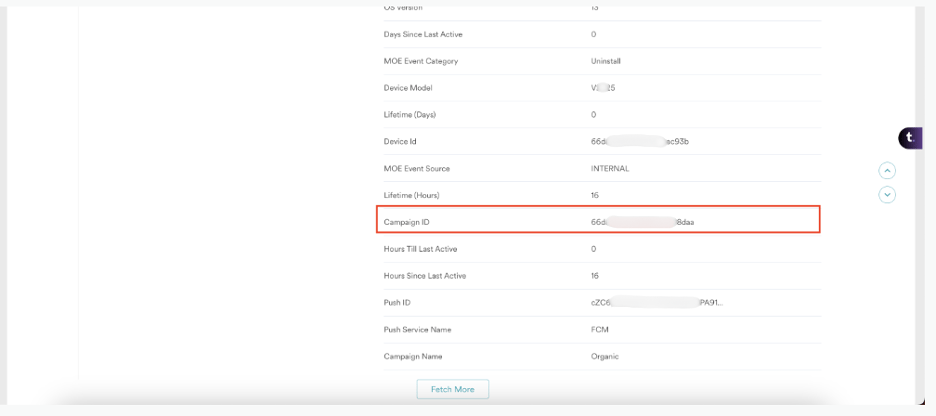 * Search for the **Campaign ID** in the dashboard.
* If the campaign was scheduled for **All Users**, it indicates that the user had uninstalled the application before the campaign could be delivered.
Since MoEngage did not receive the proper uninstall callback for this user, a guest profile was created to track this uninstall event. This process ensures that the uninstall event is recorded, even without mapping it to a registered user profile.
* Search for the **Campaign ID** in the dashboard.
* If the campaign was scheduled for **All Users**, it indicates that the user had uninstalled the application before the campaign could be delivered.
Since MoEngage did not receive the proper uninstall callback for this user, a guest profile was created to track this uninstall event. This process ensures that the uninstall event is recorded, even without mapping it to a registered user profile.